DDS (D.I.Y Drone Simulator)

Trailers & Videos[NEW] Shop & WorkbenchAbout 85 new drone components were added.Now, various racing drones can be built, ranging from 3 to 8 inches in size.[NEW] Course EditorDDS Course Editor now offers:- Course customizing in all the five existing maps- Tips and tools to help build your...
Tags
Full Controller Support
Xbox Controllers
DualShock Controllers (USB Only)
DualSense Controllers
Requires agreement to a 3rd-party EULA
Languages:
Interface Full Audio Subtitles
Ratings
18+

Violence
Sex
Bad Language

Age rating for: PEGI
Includes 57 Steam Achievements
Points Shop Items Available
86
metacritic
Recent Events & Announcements
YOU
NEWS Wed, June 10, 2026

It's All About You! — A Crew to Remember

This episode of It's All About You celebrates the unforgettable people who helped shape V's journey. Read full event details.

Buy DDS (D.I.Y Drone Simulator)

₴16.99
About This Game

Trailers & Videos


[NEW] Shop & Workbench

About 85 new drone components were added.
Now, various racing drones can be built, ranging from 3 to 8 inches in size.


[NEW] Course Editor

DDS Course Editor now offers:
- Course customizing in all the five existing maps
- Tips and tools to help build your custom course easily
- Top and Perspective view
- Course Path drawing using splines

Place spline points in Top view.
Edit spline points in Perspective view.
Build gates, flags and other objects in Perspective view.

Tips to make course customizing easy:

1. Move along the Spline
Make a new gate to follow the spline course path by clicking "Move along the Spline" button just before selecting the gate to place.
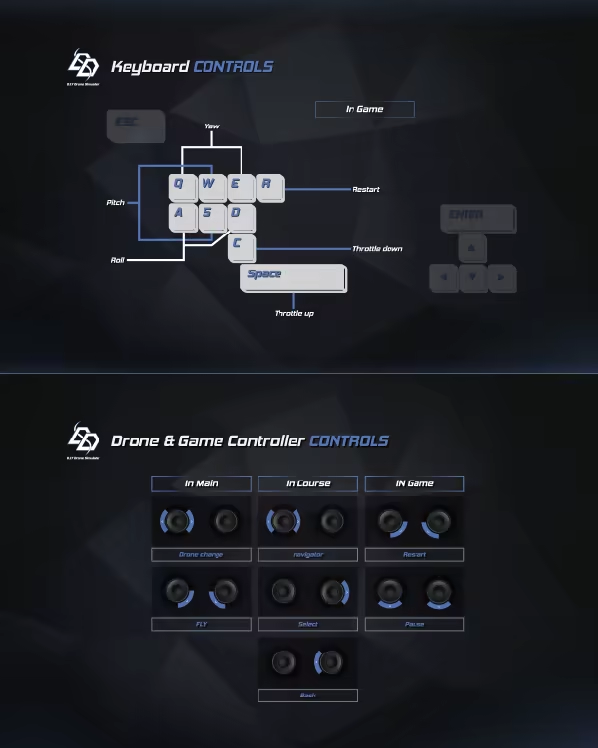
Use Q or E to move along the spline.

2. Sanp shot
Make an object stick or 'snap' to the floor by using 'Snap shot' (spacebar)

3. Ctrl + Number(1,2,3,...0)
For bigger courses, save the current position of the camera by pressing CTRL+Number(1,2,3,...0). Go back to the saved positions by pressing the numbers used.

4.Wall Gates
Wall Gates can stick to almost anything, to allow easier placement of gates in areas with low ceilings (e.g. in factory or parking lot).


--------------------------------------------------------------------------------------------------


DDS is a First and Third Person Drone Racing Simulator designed to enhance your racing drone flying skills.
You can fly various racing drones in different maps in a First or Third person view.
Build drones in this detailed and highly realistic simulator and experience a whole new racing drone experience.
You can even make your own courses.


Game Play

  • Shop & Workbench

Build your own drone by purchasing and collecting drone parts like frames, FCs, motors, ESCs, batteries, antennas, propellers or cameras.


  • D.I.Y Drone

Learn how to build a racing drone with this interactive tutorial.

  • Fly

Enjoy racing with your self-made drones and break your high score.

  • Course Cusomizing

Place spline points in Top view and then edit spline points in Perspective view.
Build gates, flags and other objects !


*Credit*

Project Manager
Hyungjoong Kim

Creative Director
Sabi Park

Programmers
Dahoon Jung, Jiin Min, Hwawon Han, Gangsan Bae

Graphics Designers
Woonwoo Lee , Gyungjong Na, Dawoom Jung

Special Thanks
Dustin Lee (Professor)
Korea Polytechnic University
We Make Drone
CEMWARE
Kyung Hee University
System Requirements
Windows
macOS
Minimum:

Requires a 64-bit processor and operating system
OS: 64-bit Windows 10
Processor: Core i7-6700 or Ryzen 5 1600
Memory: 12 GB RAM
Graphics: GeForce GTX 1060 6GB or Radeon RX 580 8GB
Storage: 70 GB available space

Recommended:

Requires a 64-bit processor and operating system
OS: 64-bit Windows 10
Processor: Core i7-12700 or Ryzen 7 7800X3D
Memory: 16 GB RAM
Graphics: GeForce RTX 2060 SUPER or Radeon RX 5700 XT
Storage: 70 GB available space